 Fardel
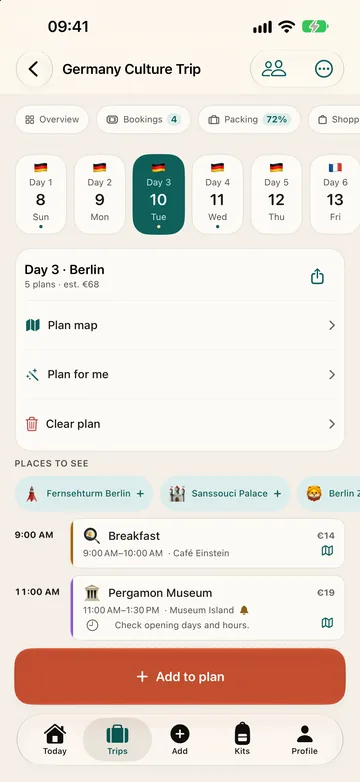
Does Fardel suggest places to see?
Yes, in the cities in Fardel's guide. A trip's plan suggests places to see in each of its cities; on the free plan you can add one of them per trip. With Fardel Pro you add them all, let “Plan for me” spread them over your days, and swap a planned place with “Suggest another place”. The trip's guide shows each city's places on the free plan too.
Plan for me
In the plan, “Plan for me” spreads the best-known places of your trip's cities over its days, two hours each, around your plans and bookings. Nothing is added until you confirm, you can leave places out, and “Undo” takes them back. It is free once, on any trip; after that, and “Plan again”, come with Pro. Deleting the plans it added does not give the free use back.
Can I add a place from Apple Maps?
Yes. In Apple Maps, open a place, tap Share and choose Fardel, then pick the trip and the day: the place joins that day's plan with a link to where it is on the map. The free plan's daily limit still applies.
On the free plan
| Free | Pro | |
|---|---|---|
| Suggested places per trip | 1 | unlimited |
| Places planned for you | — | ✓ |
What it does not do
- Suggestions cover the cities in Fardel's guide. For another city, add places yourself or share them from Apple Maps.
- It shows no opening hours: check them before you go.
- It books nothing: no tickets, tables or tours.
- Place descriptions come from Wikipedia and need a connection.