 Fardel
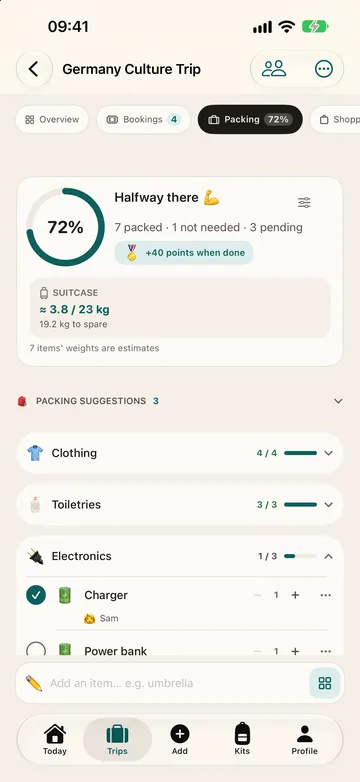
Does it work without a connection?
Yes: the lists, budget, plan and country guide work offline.
Yes. Packing, shopping, budget, plan, bookings and notes live entirely on the device. The network is needed for weather, exchange rates, map searches, finding typed places on the plan and bookings maps, the trip summary's photos, place descriptions from Wikipedia, purchases, and iCloud sync and backup. Offline, the last exchange rates are used with their date shown, and weather older than a day is marked as such.
Does it need an account?
No: there is nothing to sign up for.
No. There is no sign-up. Your trips stay on your iPhone, and syncing them between your devices through your own iCloud is optional.
Can you reuse a list on the next trip?
Yes, with kits: lists you add to any trip.
A list you use again and again. Each packing or shopping list takes one kit, chosen with “Add a kit” or “Change kit” in the list's menu; an item already on the list is not added twice. Changing or removing the kit deletes the items it added, even ticked or changed ones, and keeps the items you added yourself. Starter kits can't be edited: tap “Duplicate” for a copy of your own, or turn a trip's list into a kit with “Save as kit”. Your own kits can be shared by link or QR code; how many the free plan holds is in the “Free and Pro” table below.
Can you share a trip or a list?
Yes: companions join the trip through iCloud and see the same lists, plan and costs.
Yes. Invite your travel companions through iCloud; each can edit the trip or only view it, and everyone sees the same plan, bookings, lists and costs, while your notes, diary and files stay on your iPhone. Anyone without iCloud gets the trip through “No iCloud? Send as a file”: opening the file adds it to their app. Kits are shared with a link.
Does it keep a trip budget?
Yes, in the currencies you pay in, with costs split between travellers.
- Log expenses in the currency you pay in; each keeps the rate of the moment you log it
- More than 150 currencies, and what's left per day, today included
- Booking and plan prices go into the budget, and shopping prices can too
- Who paid: one person or several, in equal or different amounts, by card, cash or transfer
- Shared costs: who owes whom
- Crossing a border that day? Choose which country an expense, plan or booking belongs to
- A currency converter that works offline with the last rates
Yes. A cost can be paid by one person or several, in equal or different amounts, and can leave out anyone who shouldn't share it. Fardel then shows who owes whom.
Where is your data kept?
On your iPhone and in your own iCloud; a trip shared with you is kept in the iCloud of the person who shared it. No ads, no tracking.
It stays on your iPhone, and in your own iCloud if you turn on sync; a trip shared through iCloud is kept in a shared area of the sharer's iCloud, where Apple stores it and we have no access. No ads and no tracking. The details are in the Privacy Policy.
Which languages is it in?
iPhone with iOS 18 or later. Fardel is in English, Turkish, German, French, Italian, Spanish, Arabic, Japanese, Korean and Simplified Chinese.
Does it work on Apple Watch?
Yes, with a companion app for Apple Watch.
Yes. Today's plan on your wrist, or before you leave, the countdown and your first departure. Tick your packing list on the watch, or your shopping list once you're on the road, and the ticks reach your iPhone. Complications and a Smart Stack widget show the days to go, the day of the trip and your progress. It needs watchOS 11 or later and gets everything from Fardel on your iPhone.