 Fardel
Can I plan a trip with friends?
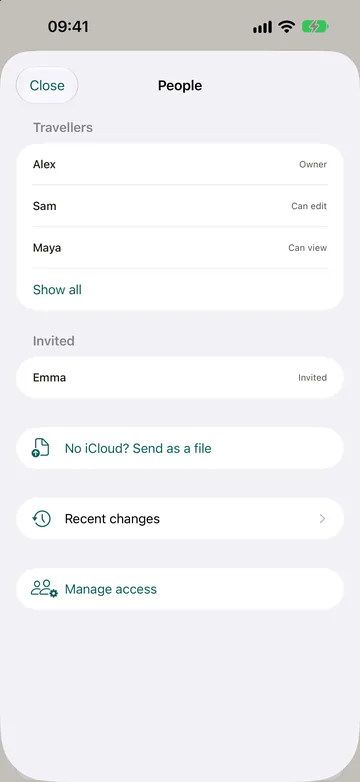
Yes. On a trip, tap the people button and invite your travel companions through iCloud; each can edit the trip or only view it. Everyone sees the same plan, bookings and lists; those who can edit tick what they bring and add what they paid, and Fardel shows who owes whom. Joining uses none of the invited person's trip slots: a shared trip follows the plan of the person who shared it. Anyone it is shared with can leave it and keep a copy; the person who shared it removes people or stops sharing under Manage access.
How it works
Open the trip and tap the people button at the top, then “Share with people”. Invite your travel companions through iCloud; only the people you invite can join, and each can edit the trip or only view it. Everyone sees the same plan, bookings, lists and costs, and your notes, diary and files stay on your phone. Joining needs iCloud. Without it, use “No iCloud? Send as a file” on the same screen: when your friend opens the file, the trip is added to their app, and a file that comes back for a trip you already have is merged after the app shows what it would change. A trip locked on the free plan can't be shared. To send only part of it as a message: “Share the day” on the plan, “Share the list” in a list's menu, or “Share” in a plan's or a booking's menu.
Splitting the costs
Add your companions under “Travel companions” on the trip's Overview. In an expense, a booking, a plan's cost or a shopping price, choose who paid: several people pay equal parts, or choose “Different amounts” and enter what each paid. Under “Shared by”, everyone shares a cost equally; untick anyone who doesn't pay a part of it. “Shared costs” on the budget screen shows each person's share and who owes whom. An expense with no payer counts as yours. “Share the balance” on that card sends it as a message, for WhatsApp and the like.
In “Travel companions”, under “Groups”, tap “New group”, give it a name if you like and tick who is in it; the same section is there when you create a trip. Open a group and tap “Remove group” to undo it. A person is in one group only. Costs are still split per person, but a group is one line in “Shared costs”, and the transfers run between the group and the others. Nobody in a group owes another.
On the free plan
| Free | Pro | |
|---|---|---|
| Companions per trip | 3 | unlimited |
| Plans and bookings per day | 4 | unlimited |
| Bookings per trip | 4 | unlimited |
On a shared trip, these limits are those of the person who shared it, for everyone on it.
What it does not do
- It needs iCloud. Without it, a companion gets the trip as a file: a copy that does not change when you edit yours.
- It does not share your notes, travel diary or attached files: those stay on your iPhone.
- It has no chat or messages inside the app.
- There is no Android or web version.